 ShufflePaper
Keep your desktop fresh.
Without touching anything.
ShufflePaper rotates your Windows wallpaper on a schedule, pulling straight from a folder you choose — shuffled or in order. No accounts, no internet, no nonsense.
Download for WindowsLatest release on GitHub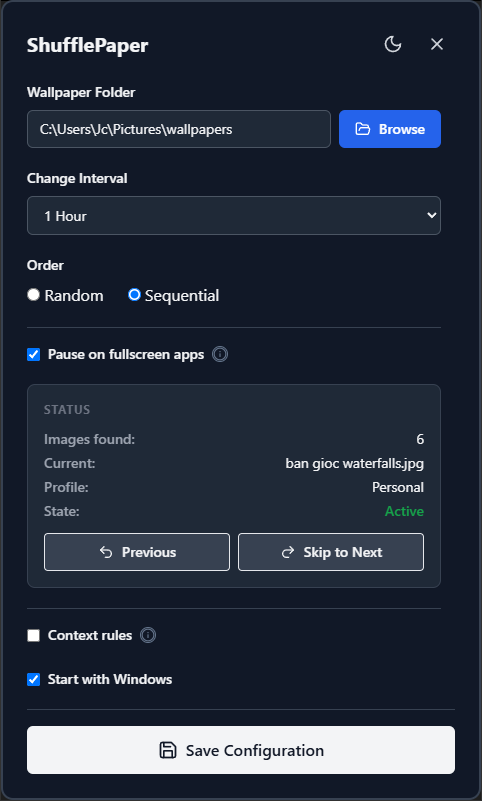
One folder, two ways to rotate
Shuffle
Every rotation brings a random pick from your collection. Great for big wallpaper folders where you never want the same picture twice in a row.
Sequential
Walks through your folder in order, one image at a time. Ideal for curated packs, photo trips, or collections with a story to tell.
Features
Everything you need from a wallpaper rotator — and nothing you don't.
Flexible interval
Set the rotation cadence anywhere from 1 minute to 24 hours. Your desktop, your pace.
Shuffle or sequential
Random surprise or ordered walk-through. Switch modes any time with one click.
Manual skip & pause
Not feeling today's pick? Skip to the next wallpaper instantly, or pause and keep it.
Start with Windows
Toggle autostart on and rotation begins at boot — no clicks needed after that.
Runs in the tray
Close the window and it keeps going in the background, with a quick tray menu.
Private by design
No network access, no telemetry. Your photos never leave your machine.
Your photos stay yours.
ShufflePaper works entirely offline. It reads images from the folder you pick and sets your wallpaper — that's all. Nothing is uploaded, nothing is tracked, and the settings file lives on your own disk.
Stop staring at the same desktop.
Get ShufflePaper for Windows · v0.3.0
Download for WindowsLatest release on GitHub